A restaurant POS for the counter, the tables and the kitchen
Ring up walk-ins and takeaway at the counter, let waiters take table orders in rounds on their phones, and send every order to the kitchen as a KOT or onto a kitchen screen. Cash, card and UPI, GST on every bill, and a counter that keeps billing when the Wi-Fi drops.
- Cash, card, UPI or split
- Waiter app with hold & send
- A KOT for each station
- Keeps billing offline
A drawing of orders arriving from three places. Names and prices are made up.
One restaurant, three systems that don’t talk
A billing machine at the counter, slips for the kitchen and a notebook for the tables. Here is the same day with one POS.
Choosing a POS
The usual way: Billing on one system, QR orders on another, and the kitchen works from paper.
With Ubasari: The counter, the waiter app, the table QR and the kitchen share one menu and one list of orders.
Buying hardware
The usual way: A billing terminal that does one job, bought before you know if it fits.
With Ubasari: Use the laptop, tablet or phone you already have, with a standard 58mm or 80mm thermal printer.
The main course
The usual way: The kitchen starts the main course while the starters are still on the table.
With Ubasari: The waiter holds the main course on their phone and sends it to the kitchen when the table is ready.
A second round
The usual way: The waiter writes another slip and walks it to each counter in the kitchen.
With Ubasari: Round 2 reaches each station on its own, as a printed KOT or on the kitchen screen.
Paying three ways
The usual way: Half in cash, half on UPI, noted on the back of the bill.
With Ubasari: Split one counter bill across cash, card and UPI, and each part is recorded against the order.
The internet drops
The usual way: Billing stops and the queue at the counter waits.
With Ubasari: The counter keeps taking orders and sends them once the internet is back, never twice.
Every part of service, in one POS
Start with the counter. Add the waiter app, table QR and kitchen screens when you need them.
- Counter POS
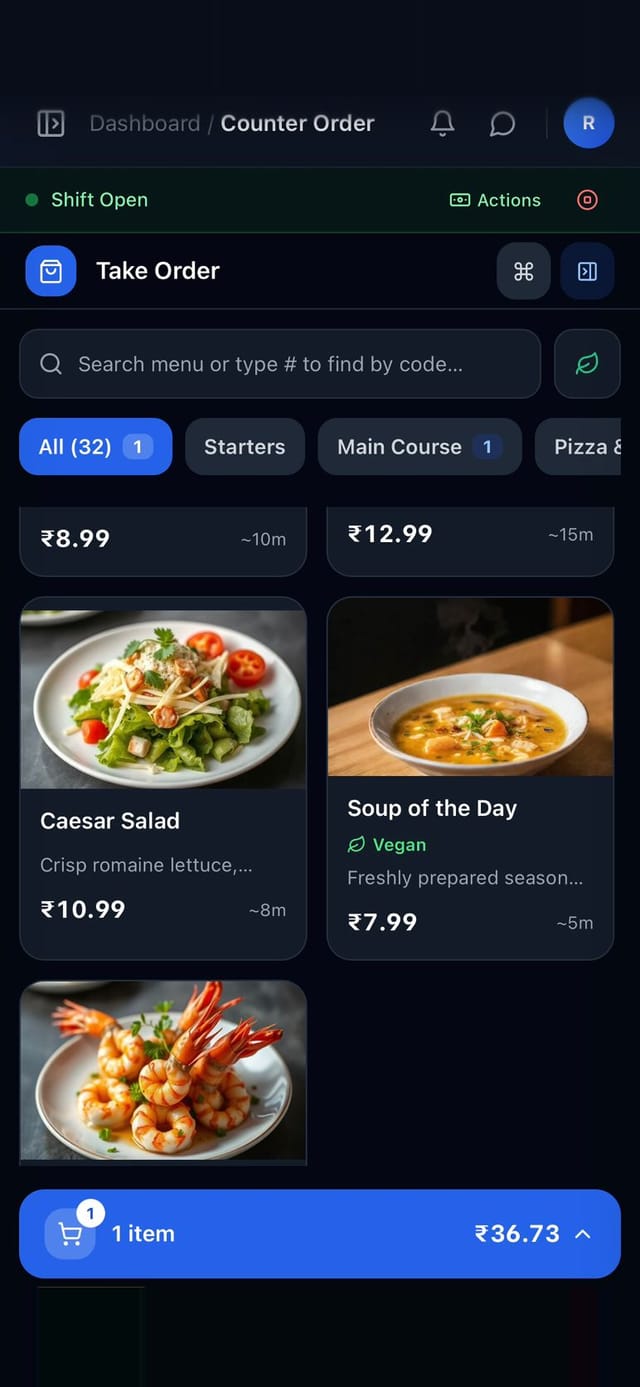
Ring up walk-ins on a laptop, tablet or phone
Search the menu, pick sizes and add-ons, choose dine-in, takeaway or delivery and add the guest’s name and number. Take cash, card or UPI, or split one bill across them. Every counter order is paid as it is placed.
- Quick cash buttons work out the change
- Keyboard shortcuts for search, payment and placing the order
- The order you are building survives an accidental reload
- Waiter app
Table orders in rounds, from the waiter’s phone
A waiter taps a free table on the floor view, adds dishes round by round, and tags each round as starters, main course, dessert or drinks. Hold the main course and send it to the kitchen when the table is ready. When the guests ask for the bill, one tap tells the counter.
- Waiters sign in with their phone number and a 4-digit PIN
- An alert when a table’s food is ready, or a dish is marked sold out
- The counter sees every open table and adds a discount before closing the bill
- To the kitchen
Every order reaches the right station
Orders from the waiter app and the table QR print a KOT for each kitchen station the moment they arrive, with only that station’s dishes and notes. Prefer screens? Each station can work from a kitchen tablet or the cooks’ own phones instead.
- A cancelled dish prints a slip, so the kitchen stops making it
- A held round prints its KOT when the waiter sends it
- The counter chimes when its own orders are ready to hand over
- Table QR orders
QR orders land in the same POS
Guests scan the QR on their table, order from their phone and add more rounds as they go. Every round joins the table’s visit, so the counter collects one payment for the whole meal and the table’s bill prints.
- Guests can pay from their phone into your own Razorpay or Paytm account
- Or they pay at the counter by cash, card or UPI
- Download each table’s QR code from your dashboard
- Printers & offline
Works with the printer you have, and without the internet
Connect a 58mm or 80mm thermal printer by USB, over your network or Wi-Fi, or through QZ Tray on a Windows PC, and choose what prints for dine-in, takeaway and delivery. If the internet goes, the counter keeps taking orders and sends them when it is back.
- Print the bill, the KOT, both or nothing for each kind of counter order
- The cash drawer can open after the bill prints
- No printer yet? Bills open in the browser’s print window

From menu to first bill in three steps
Set it up from your phone or laptop. No special hardware to buy.
- 1
Choose how you take orders
Counter billing only, counter with kitchen screens, or the counter with the QR menu, waiter app and kitchen display. Switch any time in Settings.
- 2
Add your menu and printer
Type your menu in or import a CSV, set your GST rate, and print a test bill on your thermal printer.
- 3
Open a shift and take orders
Count the cash in the drawer, open the shift and ring up your first order. Add waiters and cooks with their phone numbers.
What owners check before they choose a POS
Control over cash, staff and bills, built in.
Shifts & cash drawer
The counter takes orders only in an open shift. Record payouts and close with what the drawer should hold.
A manager’s PIN where it matters
Refunds and cancellations always need a manager’s PIN, and so do discounts of ₹500 or more.
Each person sees their part
Owners and admins run the counter, waiters use the waiter app, and cooks see only the kitchen.
GST on every bill
CGST and SGST worked out for you, with your GSTIN, FSSAI number and tax invoice number on the bill.
Bills on WhatsApp
Send the guest their bill on WhatsApp from your own business number, on the Growth and Max plans.
One list of orders
Counter, waiter and QR orders in one place, with search and filters.
Three ways to run it, one POS
Pick the one that fits today. Your plan stays the same when you switch.
Counter billing only
Bills and KOTs from the counter, with no apps for staff or guests. Good for cafés, bakeries and food-court stalls.
Counter + kitchen screens
Every order is rung up at the counter and cooked from screens or the cooks’ phones. Good for quick service and takeaway.
Full service
The counter, the table QR menu, the waiter app and the kitchen display together. Good for dine-in restaurants with a floor team.
- Core: counter POS, GST bills, KOT printing, shifts and 2 kitchen screens
- Growth: the waiter app, table QR ordering with guest payments, and 5 kitchen screens
- Max: unlimited kitchen screens and an audit log of voids, refunds and discounts
- Cash in and out, X and Z reports: Growth and Max, or an add-on on Core
It all works together
Every part of Ubasari shares the same menu, orders and reports, so a change in one place shows up everywhere.
Questions owners ask when choosing a restaurant POS
See your own menu on the counter, the tables and the kitchen
Share a few dishes and how you serve. On the demo call we’ll ring up a counter order, take a table order on the waiter app and print the KOT.
Questions first? Message us on WhatsApp
- No credit card required
- Cancel any time
- Live in 30 minutes